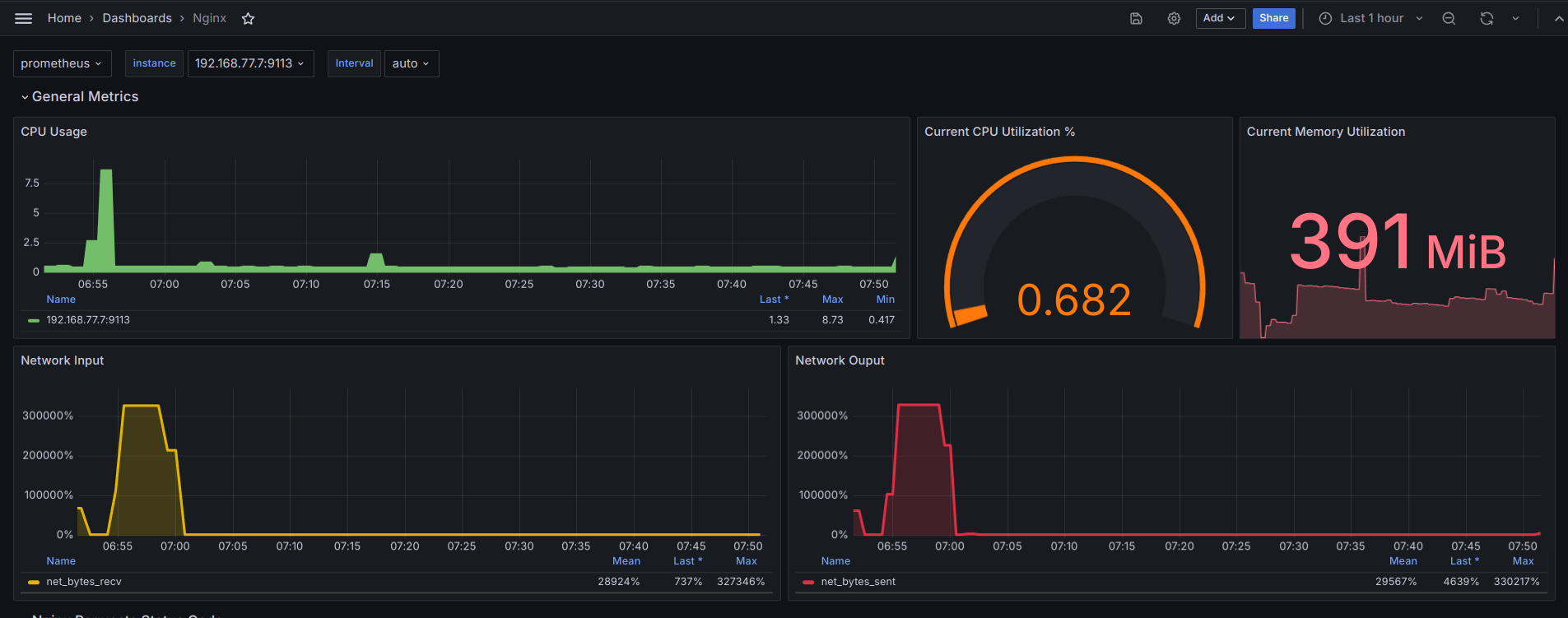
參考來源
https://docs.taler.net/system-administration/nginx-prometheus-exporter.html
https://opstree.com/blog/2021/11/09/nginx-monitoring-using-telegraf-prometheus-grafana/
檢查支援 stub_status 與否
檢查模組是否已啟用,請執行:
1
|
nginx -V 2>&1 | grep -o with-http_stub_status_module
|
輸出要看到 with-http_stub_status_module
開啟 stub_status
1
|
nano /etc/nginx/conf.d/stub_status_nginx.conf
|
貼上以下內容
 1
 2
 3
 4
 5
 6
 7
 8
 9
10
11
12
13
14
15
|
server {
listen 81 default_server;
root /var/www/html;
index index.html index.htm index.nginx-debian.html;
server_name _;
  location / {
  try_files $uri $uri/ =404;
  }

  location /nginx_status {
  stub_status;
  allow 127.0.0.1;
  deny all;
  }
}
|
測試是否有錯誤
輸出 test is successful 表示ok nginx 重載設定
確保正確
1
|
curl http://127.0.0.1:81/nginx_status
|
輸出會看到
1
2
3
4
|
Active connections: 3
server accepts handled requests
 268 268 2279
Reading: 0 Writing: 1 Waiting: 2
|
telegraf
前往
https://docs.influxdata.com/telegraf/v1/install/
照頁面提示安裝
ubuntu 的 path 位於 /etc/telegraf
更改設定前先備份
1
|
cd /etc/telegraf;cp telegraf.conf bak;rm telegraf.conf
|
複製貼上設定檔
貼上
 1
 2
 3
 4
 5
 6
 7
 8
 9
10
11
12
13
14
15
16
17
18
19
20
21
22
23
24
25
26
27
28
29
30
31
32
33
34
35
36
|
[global_tags]

[agent]
  interval = "60s"
  round_interval = true
  metric_batch_size = 1000
  metric_buffer_limit = 10000
  collection_jitter = "0s"
  flush_interval = "30s"
  flush_jitter = "0s"
  debug = false
  quiet = false
  logfile = "/var/log/telegraf/telegraf.log"
  omit_hostname = false

[[inputs.nginx]]
urls = ["http://127.0.0.1:81/nginx_status"]
response_timeout = "5s"
[[inputs.tail]]
name_override = "nginxlog"
files = ["/var/log/nginx/access.log"]
from_beginning = true
pipe = false
data_format = "grok"
grok_patterns = ["%{COMBINED_LOG_FORMAT}"]
[[inputs.cpu]]
percpu = true
[[inputs.disk]]
[[inputs.diskio]]
[[inputs.net]]
[[inputs.mem]]
[[inputs.system]]

## 輸出設定 telegraf port
[[outputs.prometheus_client]]
    listen = "0.0.0.0:9113"
|
重啟載入
1
|
systemctl restart telegraf
|
如有錯誤使用以下指令除錯
1
|
journalctl --no-pager --unit telegraf
|
如顯示無法打開日誌,修正權限
1
|
chown -R telegraf:telegraf /var/log/telegraf
|
因只有一個要後拋有修改只限讀取 ImportCredential=telegraf.conf
nano /etc/systemd/system/multi-user.target.wants/telegraf.service
 1
 2
 3
 4
 5
 6
 7
 8
 9
10
11
12
13
14
15
16
17
18
19
20
21
22
|
[Unit]
Description=Telegraf
Documentation=https://github.com/influxdata/telegraf
After=network-online.target
Wants=network-online.target

[Service]
Type=notify
NotifyAccess=all
EnvironmentFile=-/etc/default/telegraf
User=telegraf
ImportCredential=telegraf.conf
ExecStart=/usr/bin/telegraf -config /etc/telegraf/telegraf.conf -config-directory /etc/telegraf/telegraf.d $TELEGRAF_OPTS
ExecReload=/bin/kill -HUP $MAINPID
Restart=on-failure
RestartForceExitStatus=SIGPIPE
KillMode=mixed
LimitMEMLOCK=8M:8M
PrivateMounts=true

[Install]
WantedBy=multi-user.target
|
重載入 systemd
1
|
systemctl daemon-reload;systemctl start telegraf.service;systemctl status telegraf.service
|
nginx-prometheus-exporter
版本資訊 url: https://github.com/nginxinc/nginx-prometheus-exporter/tags
cli
1
2
3
4
5
6
|
mkdir -p /tmp/nginx_exporter_tmp && cd /tmp/nginx_exporter_tmp
mkdir -p /opt/nginx-exporter
wget https://github.com/nginxinc/nginx-prometheus-exporter/releases/download/v1.3.0/nginx-prometheus-exporter_1.3.0_linux_amd64.tar.gz
tar axf nginx-prometheus-exporter_1.3.0_linux_amd64.tar.gz
chown nginx-exporter:nginx-exporter *
cp -r * /opt/nginx-exporter/
|
創專用使用者 指定沒有家目錄 無法使用 shell
1
|
useradd --system --no-create-home --shell /bin/false nginx-exporter
|
systemd 啟用服務
1
|
nano /etc/systemd/system/nginx-exporter.service
|
貼上
 1
 2
 3
 4
 5
 6
 7
 8
 9
10
11
12
13
14
15
16
17
|
[Unit]
Description=NGINX Prometheus Exporter
Wants=network-online.target
After=network-online.target

StartLimitIntervalSec=0

[Service]
User=nginx-exporter
Group=nginx-exporter
Type=simple
Restart=on-failure
RestartSec=5s
ExecStart=/opt/nginx-exporter/nginx-prometheus-exporter --nginx.scrape-uri=http://localhost:81/nginx_status --web.systemd-socket

[Install]
WantedBy=multi-user.target
|
驗證 如無資訊輸出,表示之前有錯誤的地方!!
1
|
curl http://localhost:9113/metrics
|
socket 可以省略部份,非必要
1
|
nano /etc/systemd/system/nginx-exporter.socket
|
貼上
1
2
3
4
5
6
7
8
|
[Unit]
Description=NGINX Prometheus Exporter

[Socket]
ListenStream=9113

[Install]
WantedBy=sockets.target
|
有修改需重載入systemd
1
|
systemctl daemon-reload
|
打開 開機啟動 與 馬上開始服務
1
|
systemctl enable nginx-exporter.service;systemctl start nginx-exporter.service;systemctl status nginx-exporter.service
|
prometheus 設定檔增加來源
1
|
nano /etc/prometheus/prometheus.yml
|
本機安裝 prometheus
1
2
3
4
|
# Job, for nginx_exporter
  - job_name: 'nginx_exporter'
    static_configs:
      - targets: ['localhost:9113'] # choose port number
|
docker-compose.yaml
使用 docker compose 如非本機,則為 docker_host 所在 ip
docker-compose.yaml
 1
 2
 3
 4
 5
 6
 7
 8
 9
10
11
12
13
14
15
16
17
18
19
20
21
22
23
24
25
26
27
28
29
30
31
32
33
34
35
36
37
38
39
40
41
42
43
44
45
46
47
48
49
50
|
#version: "3"
services:

  prometheus:
    image: prom/prometheus
    container_name: prometheus
    ports:
      - '9090:9090'
    volumes:
      - ./data/prometheus:/etc/prometheus
      - /etc/timezone:/etc/timezone
    networks:
      - monitor

  influxdb:
    image: influxdb
    container_name: influxdb
    ports:
      - "8086:8086"
    restart: always
    volumes:
      - ./data/influxdb:/var/lib/influxdb2:rw
      - /etc/timezone:/etc/timezone
    networks:
      - monitor

  grafana:
    image: grafana/grafana
    container_name: grafana
    user: '1000'
    ports:
      - "3000:3000"
    restart: always
    networks:
      - monitor
    volumes:
      - ./data/grafana:/var/lib/grafana
      - /etc/timezone:/etc/timezone
#    environment:
#      - GF_SERVER_ROOT_URL=http://grafana_ip:3000
#      - GF_AUTH_DISABLE_LOGIN_FORM=false
#      - GF_AUTH_GOOGLE_ENABLED=true
#      - GF_AUTH_GOOGLE_CLIENT_ID=012345678912-testestest.apps.googleusercontent.com
#      - GF_AUTH_GOOGLE_CLIENT_SECRET=rhtsjyrkjytjkydtjyjdyj
#      - GF_AUTH_GOOGLE_ALLOWED_DOMAINS=grafana.com
#      - GF_AUTH_GOOGLE_ALLOW_SIGN_UP=true


networks:
  monitor:
|
prometheus 設定檔增加來源
/home/carter/grafana/data/prometheus/prometheus.yml
1
2
3
4
|
# Job, for nginx_exporter
  - job_name: 'nginx_exporter'
    static_configs:
      - targets: ['nginx_ip:9113'] # choose port number
|