Featured image of post Docker Compose Frigate - NVR

Docker Compose Frigate - NVR

home assistant NVR

Frigate 官方網站 更新於2024/08/28

https://frigate.video/
說明文件
https://docs.frigate.video/

Nvidia docker-compose.yaml

ubuntu 22.04 docker compose frigate/
注意:nvidia-drive nvidia-docker2

 1
 2
 3
 4
 5
 6
 7
 8
 9
10
11
12
13
14
15
16
17
18
19
20
21
22
23
24
25
26
27
28
29
30
31
32
33
34
35
36
37
38
39
40
41
version: '3.9'

services:

  frigate:
    container_name: frigate
    privileged: true
    restart: unless-stopped
    image: ghcr.io/blakeblackshear/frigate:0.12.0-tensorrt
#    runtime: nvidia
    deploy:
      resources:
        reservations:
          devices:
            - capabilities: [gpu]
    shm_size: "512mb" # update for your cameras based on calculation above
#    devices:
#      - /dev/bus/usb:/dev/bus/usb  #coral tpu AI辨識
#      - /dev/apex_0:/dev/apex_0 #直通 PCIe Coral,driver > https://coral.ai/docs/m2/get-started/#2a-on-linux
#      - /dev/dri/renderD128 # for intel gpu hardware
    volumes:
      - /etc/localtime:/etc/localtime:ro
      - ./config:/config
      - ./trt-models:/trt-models
#      - ./nvr-data:/media/frigate
#      - /vm31/nvr-data:/media/frigate
      - /root/smb:/media/frigate
      - type: tmpfs # Optional: 1GB of memory, reduces SSD/SD Card wear
        target: /tmp/cache
        tmpfs:
          size: 1000000000
    ports:
      - "5000:5000"
      - "1935:1935" # RTMP feeds
      - "8554:8554" # RTSP feeds
      - "8555:8555/tcp" # WebRTC over tcp
      - "8555:8555/udp" # WebRTC over udp
    environment:
      FRIGATE_RTSP_PASSWORD: "passwd"
      NVIDIA_VISIBLE_DEVICES: all
      NVIDIA_DRIVER_CAPABILITIES: compute,video,utility

Nvidia config/cnfig.yml

官網配置說明
https://docs.frigate.video/configuration/
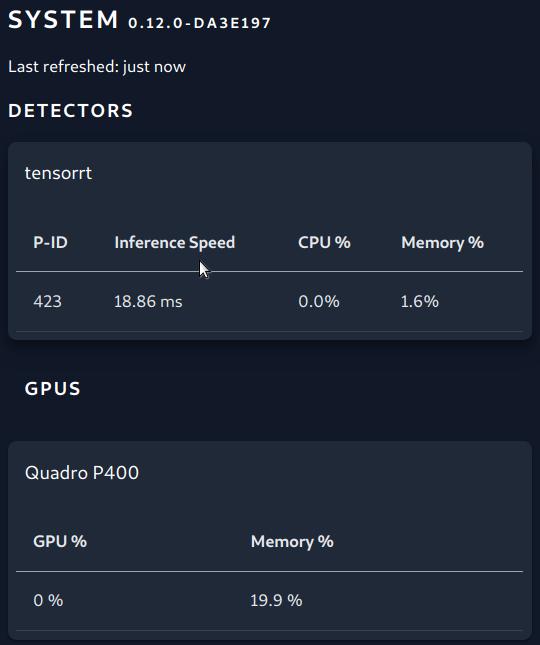
tensorrt 建構
https://docs.frigate.video/configuration/detectors#nvidia-tensorrt-detector

nvidia-detector


  1
  2
  3
  4
  5
  6
  7
  8
  9
 10
 11
 12
 13
 14
 15
 16
 17
 18
 19
 20
 21
 22
 23
 24
 25
 26
 27
 28
 29
 30
 31
 32
 33
 34
 35
 36
 37
 38
 39
 40
 41
 42
 43
 44
 45
 46
 47
 48
 49
 50
 51
 52
 53
 54
 55
 56
 57
 58
 59
 60
 61
 62
 63
 64
 65
 66
 67
 68
 69
 70
 71
 72
 73
 74
 75
 76
 77
 78
 79
 80
 81
 82
 83
 84
 85
 86
 87
 88
 89
 90
 91
 92
 93
 94
 95
 96
 97
 98
 99
100
101
102
103
104
105
106
107
108
109
110
111
112
113
114
115
116
117
118
119
120
121
122
123
124
125
126
127
128
129
130
131
132
133
134
135
136
137
138
139
140
141
142
143
144
145
146
147
148
149
150
151
152
153
154
155
156
157
158
159
160
161
162
163
164
165
166
167
168
169
170
171
172
173
174
175
176
177
178
179
180
181
182
183
184
185
186
187
188
189
190
191
192
193
194
195
196
197
198
199
200
201
ui:
  use_experimental: false
  live_mode: mse

mqtt:
  enabled: true
  host: ha ip
  port: 1883
  topic_prefix: frigate
  client_id: frigate
  user: mqttuser
  password: mqttuser
  stats_interval: 300

ffmpeg:
  hwaccel_args: preset-nvidia-h264 #nvidia gpu
  output_args:
    record: preset-record-generic-audio-aac #sound out
#  hwaccel_args: preset-vaapi
#錄影秒數
record:
  expire_interval: 15
  enabled: True
  retain:
    days: 7
    mode: motion
# 註解掉 mode:連續錄影 motion 運動檢測 active_objects 物體移動 all 包含運動跟物體
  events:
#    pre_capture: 3 #偵測錄影前提前1秒
#    post_capture: 3 #偵測錄影後剪輯往後3秒
    retain:
      default: 14
      mode: active_objects
      objects:
        person: 7

#偵測器(運動檢測)
detectors:
  tensorrt:
    type: tensorrt
    device: 0 #This is the default, select the first GPU

model:
  path: /trt-models/yolov7-tiny-416.trt
  input_tensor: nchw
  input_pixel_format: rgb
  width: 416
  height: 416

objects:
  track:
    - person
  filters:
    person:
      min_area: 5000
      max_area: 100000

snapshots:
  enabled: True
  clean_copy: True
  timestamp: False
  bounding_box: True
  crop: False
  height: 175
  required_zones: []
  retain:
    default: 7
    objects:
      person: 7


#錄影時間戳設置參數
timestamp_style:
  position: "tl" #"tl" (top left), "tr" (top right), "bl" (bottom left), "br" (bottom right)
  format: "%m/%d/%Y %H:%M:%S"
  color:
    red: 255
    green: 255
    blue: 255
  thickness: 2
  effect: shadow

go2rtc:
  streams:
    gate:
      - "ffmpeg:rtsp://admin:pwsswd@192.168.88.53:554/stream1#video=copy#audio=copy#audio=aac"
    gate_sub:
      - "ffmpeg:rtsp://admin:passwd@192.168.88.53:554/stream2#video=copy#audio=copy#audio=aac"
    3f:
      - "ffmpeg:rtsp://admin:passwd@192.168.88.54:554/stream1#video=copy#audio=copy#audio=aac"
    3f_sub:
      - "ffmpeg:rtsp://admin:passwd@192.168.88.54:554/stream2#video=copy#audio=copy#audio=aac"
    webrtc:
      candidates:
        - 127.0.0.1:8555
        - stun:8555
cameras:
  gate:
    ffmpeg:
      inputs:
        - path: rtsp://127.0.0.1:8554/gate
          input_args: preset-rtsp-restream
          roles:
            - record
        - path: rtsp://127.0.0.1:8554/gate_sub
          input_args: preset-rtsp-restream
          roles:
            - detect
    record:
      enabled: True
    detect:
      width: 640
      height: 360
      fps: 7
    objects:
      track:
        - person
      filters:
        person:
          mask:
            - 0,190,135,128,138,90,252,95,270,149,483,165,561,360,640,360,640,0,0,0
          min_score: 0.4
          threshold: 0.5
          min_area: 700
    snapshots:
      enabled: true
      timestamp: true
      bounding_box: true
      crop: True
      height: 500
      retain:
        default: 3
    zones:
      zone_0:
        coordinates: 282,360,552,360,482,164,271,163,271,90,225,92,141,85,136,129,0,201,0,360
    motion:
      mask:
        - 478,178,566,360,640,360,640,0,359,0,0,0,0,89,273,90,279,152
        - 148,135,159,0,0,0,0,198

  3f:
    ffmpeg:
      inputs:
        - path: rtsp://127.0.0.1:8554/3f
          input_args: preset-rtsp-restream
          roles:
            - record
        - path: rtsp://127.0.0.1:8554/3f_sub
          input_args: preset-rtsp-restream
          roles:
            - detect
    record:
      enabled: True
    detect:
      width: 640
      height: 360
      fps: 5
    objects:
      track:
        - person
      filters:
        person:
          mask:
            - 0,0,0,311,640,307,640,360,0,360
          min_score: 0.4
          threshold: 0.5
          min_area: 700
    zones:
      zone_0:
        coordinates: 640,360,640,42,0,39,0,360
    motion:
      mask:
        - 640,110,640,0,0,0,0,33
    snapshots:
      enabled: true
      timestamp: true
      bounding_box: true
      crop: True
      height: 500
      retain:
        default: 3

#detectors:
#  coral:
#    type: edgetpu
#    device: usb

rtmp:
  enabled: false

birdseye:
  enabled: True
  restream: False
  width: 1920
  height: 1080
  quality: 8
  mode: continuous

live:
  height: 640
  quality: 1

Intel Gpu docker-compose.yaml

 1
 2
 3
 4
 5
 6
 7
 8
 9
10
11
12
13
14
15
16
17
18
19
20
21
22
23
24
25
26
27
28
29
30
31
32
33
34
version: '3.9'

services:

  frigate:
    container_name: frigate
    privileged: true
    restart: unless-stopped
    image: ghcr.io/blakeblackshear/frigate:stable
    cap_add:
      - CAP_PERFMON
    shm_size: "128mb" # update for your cameras based on calculation above
    devices:
#      - /dev/bus/usb:/dev/bus/usb  #coral tpu AI辨識
#      - /dev/apex_0:/dev/apex_0 #直通 PCIe Coral,driver > https://coral.ai/docs/m2/get-started/#2a-on-linux
      - /dev/dri/renderD128 # for intel gpu hardware
    volumes:
      - /etc/localtime:/etc/localtime:ro
      - ./config:/config
#      - ./nvr-data:/media/frigate
      - /root/smb:/media/frigate

      - type: tmpfs # Optional: 1GB of memory, reduces SSD/SD Card wear
        target: /tmp/cache
        tmpfs:
          size: 1000000000
    ports:
      - "5000:5000"
      - "1935:1935" # RTMP feeds
      - "8554:8554" # RTSP feeds
      - "8555:8555/tcp" # WebRTC over tcp
      - "8555:8555/udp" # WebRTC over udp
    environment:
      FRIGATE_RTSP_PASSWORD: "passwd"

Intel Gpu config/config.yml

官網配置說明
https://docs.frigate.video/configuration/
OpenVINO檢測器
https://docs.frigate.video/configuration/detectors#openvino-detector

Intel-gpu

  1
  2
  3
  4
  5
  6
  7
  8
  9
 10
 11
 12
 13
 14
 15
 16
 17
 18
 19
 20
 21
 22
 23
 24
 25
 26
 27
 28
 29
 30
 31
 32
 33
 34
 35
 36
 37
 38
 39
 40
 41
 42
 43
 44
 45
 46
 47
 48
 49
 50
 51
 52
 53
 54
 55
 56
 57
 58
 59
 60
 61
 62
 63
 64
 65
 66
 67
 68
 69
 70
 71
 72
 73
 74
 75
 76
 77
 78
 79
 80
 81
 82
 83
 84
 85
 86
 87
 88
 89
 90
 91
 92
 93
 94
 95
 96
 97
 98
 99
100
101
102
103
104
105
106
107
108
109
110
111
112
113
114
115
116
117
118
119
120
121
122
123
124
125
126
127
128
129
130
131
132
133
134
135
136
137
138
139
140
141
142
143
144
145
146
147
148
149
150
151
152
153
154
155
156
157
158
159
160
161
162
163
164
165
166
167
168
169
170
171
172
173
174
175
176
177
178
179
180
181
182
183
184
185
186
187
188
189
190
191
192
193
194
195
196
197
198
199
200
201
202
203
204
205
ui:
  use_experimental: false
  live_mode: mse

mqtt:
  enabled: true
  host: ha ip
  port: 1883
  topic_prefix: frigate
  client_id: frigate
  user: mqttuser
  password: mqttuser
  stats_interval: 300
#intel gpu 輸出聲音(錄影)
ffmpeg:
  hwaccel_args: preset-vaapi
  output_args:
    record: preset-record-generic-audio-aac
#錄影秒數
record:
  expire_interval: 10
  enabled: True
  retain:
    days: 7
    mode: motion
# 註解掉mode 7/24錄影 motion運動檢測 active_objects物體移動 all包含運動跟物體
  events:
    pre_capture: 4 #偵測錄影前提前1秒
    post_capture: 3 #偵測錄影後剪輯往後3秒
    retain:
      default: 14
      mode: active_objects
      objects:
        person: 7

#偵測器(運動偵測)
detectors:
  ov:
    type: openvino
    device: AUTO
    model:
      path: /openvino-model/ssdlite_mobilenet_v2.xml

model:
  width: 300
  height: 300
  input_tensor: nhwc
  input_pixel_format: bgr
  labelmap_path: /openvino-model/coco_91cl_bkgr.txt

objects:
  track:
    - person
  filters:
    person:
      min_area: 5000
      max_area: 100000

snapshots:
  enabled: True
  clean_copy: True
  timestamp: False
  bounding_box: True
  crop: False
  height: 175
  required_zones: []
  retain:
    default: 7
    objects:
      person: 7

#錄影時間戳設置參數 thickness:字體大小 effect:字體陰影
timestamp_style:
  position: "tl"
  format: "%m/%d/%Y %H:%M:%S"
  color:
    red: 255
    green: 255
    blue: 255
  thickness: 2
  effect: shadow

go2rtc:
  streams:
    gate:
      - "ffmpeg:rtsp://admin:passwd@192.168.88.53:554/stream1#video=copy#audio=copy#audio=aac"
    gate_sub:
      - "ffmpeg:rtsp://admin:passwd@192.168.88.53:554/stream2#video=copy#audio=copy#audio=aac"
    3f:
      - "ffmpeg:rtsp://admin:passwd@192.168.88.54:554/stream1#video=copy#audio=copy#audio=aac"
    3f_sub:
      - "ffmpeg:rtsp://admin:passwd@192.168.88.54:554/stream2#video=copy#audio=copy#audio=aac"
    webrtc:
      candidates:
        - 127.0.0.1:8555
        - stun:8555

cameras:
  gate:
    ffmpeg:
      inputs:
        - path: rtsp://127.0.0.1:8554/gate
          input_args: preset-rtsp-restream
          roles:
            - record
        - path: rtsp://127.0.0.1:8554/gate_sub
          input_args: preset-rtsp-restream
          roles:
            - detect
    record:
      enabled: True
    detect:
      width: 640
      height: 360
      fps: 5
    objects:
      track:
        - person
      filters:
        person:
          mask:
            - 0,190,135,128,138,90,252,95,270,149,483,165,561,360,640,360,640,0,0,0
          min_score: 0.4
          threshold: 0.5
          min_area: 700
    snapshots:
      enabled: true
      timestamp: true
      bounding_box: true
      crop: True
      height: 500
      retain:
        default: 3
    zones:
      zone_0:
        coordinates: 282,360,552,360,482,164,271,163,271,90,225,92,141,85,136,129,0,201,0,360
    motion:
      mask:
        - 478,178,566,360,640,360,640,0,359,0,0,0,0,89,273,90,279,152
        - 148,135,159,0,0,0,0,198

  3f:
    ffmpeg:
      inputs:
        - path: rtsp://127.0.0.1:8554/3f
          input_args: preset-rtsp-restream
          roles:
            - record
        - path: rtsp://127.0.0.1:8554/3f_sub
          input_args: preset-rtsp-restream
          roles:
            - detect
    record:
      enabled: True
    detect:
      width: 640
      height: 360
      fps: 5
    objects:
      track:
        - person
      filters:
        person:
          mask:
#            - 0,360,640,360,640,47,0,44
          min_score: 0.4
          threshold: 0.5
          min_area: 700
    zones:
      zone_0:
        coordinates: 640,360,640,42,0,39,0,360
    motion:
      mask:
        - 640,110,640,0,0,0,0,33
    snapshots:
      enabled: true
      timestamp: true
      bounding_box: true
      required_zones:
        - gateclose_in
        - gate_whole_area
      crop: True
      height: 500
      retain:
        default: 3

#detectors:
#  coral:
#    type: edgetpu
#    device: usb

rtmp:
  enabled: false

birdseye:
  enabled: True
  restream: False
  width: 1920
  height: 1080
  quality: 8
  mode: continuous

live:
  height: 640
  quality: 1

HA onvif and ptz

ha 先用 onvif camera 導入 ipcam
onvif 控制 ipcam
Ha 設定 > 自動化 > 腳本 > yaml編輯
貼上後再用視覺化編輯 > 連續 選取 ipcam
distance: 0.12 < 移動速度調整

 1
 2
 3
 4
 5
 6
 7
 8
 9
10
alias: turn_left
sequence:
  - service: onvif.ptz
    data:
      pan: RIGHT
      distance: 0.12
    target:
      device_id: 24ff4dd62b369f46d24f99486240f22f
mode: single
icon: mdi:arrow-left-bold-circle

 1
 2
 3
 4
 5
 6
 7
 8
 9
10
alias: turn_right
sequence:
  - service: onvif.ptz
    data:
      pan: LEFT
      distance: 0.12
    target:
      device_id: 24ff4dd62b369f46d24f99486240f22f
mode: single
icon: mdi:arrow-right-bold-circle

 1
 2
 3
 4
 5
 6
 7
 8
 9
10
alias: turn_up
sequence:
  - service: onvif.ptz
    data:
      distance: 0.12
      tilt: DOWN
    target:
      device_id: 24ff4dd62b369f46d24f99486240f22f
mode: single
icon: mdi:arrow-up-bold-circle

 1
 2
 3
 4
 5
 6
 7
 8
 9
10
alias: turn_down
sequence:
  - service: onvif.ptz
    data:
      distance: 0.12
      tilt: UP
    target:
      device_id: 24ff4dd62b369f46d24f99486240f22f
mode: single 
icon: mdi:arrow-down-bold-circle 

預設點 (於 IPcam-APP 裡設定)

 1
 2
 3
 4
 5
 6
 7
 8
 9
10
11
alias: preset1
sequence:
  - service: onvif.ptz
    data:
      distance: 0.12
      preset: "1"
      move_mode: GotoPreset
    target:
      device_id: 24ff4dd62b369f46d24f99486240f22f
mode: single
icon: mdi:arrow-collapse-all

拉近(放大物體)

 1
 2
 3
 4
 5
 6
 7
 8
 9
10
alias: 3f_in
sequence:
  - service: onvif.ptz
    data:
      distance: 0.15
      zoom: ZOOM_IN
    target:
      device_id: 1f5322054b437303a2af54ad0e6f053c
mode: single
icon: mdi:arrow-expand

拉遠(縮小物體)

 1
 2
 3
 4
 5
 6
 7
 8
 9
10
alias: 3f_out
sequence:
  - service: onvif.ptz
    data:
      distance: 0.15
      zoom: ZOOM_OUT
    target:
      device_id: 1f5322054b437303a2af54ad0e6f053c
mode: single
icon: mdi:arrow-collapse

HA frigate card

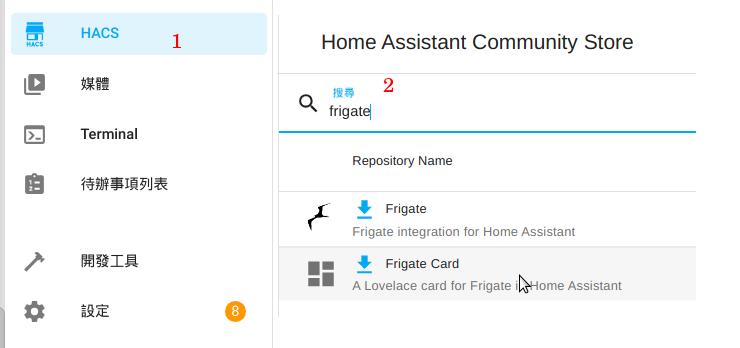
於 ha 內使用 frigate card
hacs 導入 frigate card
hacs

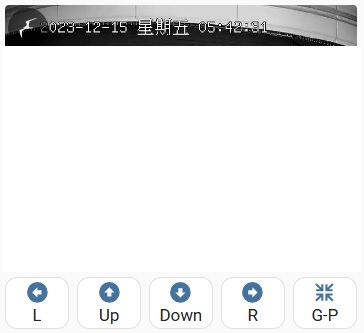
垂直卡 ( frigate card 加 水平卡 - onvif 控制 )
frigate card
entity: script.1702054234951
entity: script.1702057221703
entity: script.turn_down
entity: script.turn_right
4個 entity 為移動控制腳本
需修改對應到正確名稱,建議各動作都檢查

 1
 2
 3
 4
 5
 6
 7
 8
 9
10
11
12
13
14
15
16
17
18
19
20
21
22
23
24
25
26
27
28
29
30
31
32
33
34
35
36
37
38
39
40
41
42
43
44
45
46
47
48
49
50
51
52
53
54
55
56
57
58
59
60
61
62
63
64
65
66
67
68
69
70
71
72
73
74
75
76
77
78
79
type: vertical-stack
cards:
  - type: custom:frigate-card
    cameras:
      - camera_entity: camera.gate
        live_provider: jsmpeg
        hide: false
    view:
      timeout_seconds: 0
      update_force: false
      update_cycle_camera: false
      default: live
      update_seconds: 0
    live:
      preload: true
      zoomable: true
      lazy_load: true
      microphone:
        always_connected: true
    menu:
      buttons:
        'mute:':
          enable: true
        microphone:
          enabled: true
          alignment: matching
          icon: mdi:microphone-settings
          type: momentary
      play:
        enable: true
        microphone:
          enabled: true
          alignment: matching
          icon: mdi:microphone
          type: momentary
      alignment: bottom
      style: outside
  - type: horizontal-stack
    cards:
      - type: custom:button-card
        show_name: true
        show_icon: true
        tap_action:
          action: toggle
        entity: script.1702054234951
        name: L
        icon_height: 20px
      - type: custom:button-card
        show_name: true
        show_icon: true
        tap_action:
          action: toggle
        entity: script.1702057221703
        name: Up
        icon_height: 20px
      - type: custom:button-card
        show_name: true
        show_icon: true
        tap_action:
          action: toggle
        entity: script.turn_down
        name: Down
        icon_height: 20px
      - type: custom:button-card
        show_name: true
        show_icon: true
        tap_action:
          action: toggle
        entity: script.turn_right
        name: R
        icon_height: 20px
      - type: custom:button-card
        show_name: true
        show_icon: true
        tap_action:
          action: toggle
        entity: script.preset1
        name: G-P
        icon_height: 20px

Line 通知觸發偵測

Line通知教學 Line Notify
https://github.com/loveflee/autosend-photo-inha-line

設定 > 自動化 > 新增自動化 > 右上三小點以YAML編輯
複製貼上後再以視覺化編輯去修正各個設置

 1
 2
 3
 4
 5
 6
 7
 8
 9
10
11
12
13
14
15
16
17
18
19
20
21
22
23
24
25
26
27
28
29
30
alias: 電動門移動達3秒偵測
description: 車庫人形偵測
trigger:
  - platform: state
    entity_id:
      - binary_sensor.gate_person_occupancy
    for:
      hours: 0
      minutes: 0
      seconds: 3
    to: "on"
    from: "off"
condition:
  - condition: time
    after: "00:05:00"
    before: "07:00:00"
    enabled: false
action:
  - service: notify.line_notification
    data:
      message: Gate all occupancy 移動偵測已達4秒
  - service: camera.record
    data:
      lookback: 0
      filename: /media/'{{('%Y%m%d%H%M') }}'.mp4
      duration: 20
    target:
      device_id: 24ff4dd62b369f46d24f99486240f22f
    enabled: false
mode: single
Licensed under CC BY-NC-SA 4.0
Built with Hugo
Theme Stack designed by Jimmy